The Honest Reality of Gaming on Linux
Linux gaming is better than ever, thanks to Valve. But what happens when you try to push your luck with repack games? Here is my raw experience.

For the past few years, I’ve been using Linux.
The reason is simple: I’m just not a big fan of Windows and all of its endless drama.
Plus, I’ve already spent a lot of time working on macOS.
Since both Linux and macOS are UNIX-based, switching between them didn’t really feel like a massive leap.
Using Linux gives you a distinct sense of ownership, because the OS truly feels 100% yours.
Naturally, I spent a ton of time rice-ing and tweaking my setup.
Until eventually, I hit a point where there was absolutely nothing left to tweak, because everything was already perfectly tailored to my preference.
In that moment of boredom, I thought to myself, “Why don’t I try gaming on this thing?”
Especially since Valve has been aggressively pouring money and resources into optimizing the Steam Deck and SteamOS (which is Arch Linux-based).
That right there was the ultimate turning point that made Linux gaming evolve at a breakneck speed.
So, I decided to give it a shot.
When it comes to official Steam games, they run absolutely flawlessly on Linux.
Usually, I just double-check ProtonDB before hitting install, just to make sure the game has a playable status.
Titles like Dota 2 or CS2? Don’t even ask. They run smooth as butter.
Until curiosity got the best of me… and I tried installing repack games.
Disclaimer first: please don’t follow my lead here, because pirating games is definitely not a good thing.
But then again, this was strictly for educational purposes, lmao.
For my first experiment, I tried installing F1 22 (mostly because I was too lazy to download the latest version).
I used the “Add a Non-Steam Game” method through the Steam client.
And guess what? It ran incredibly smooth. I was having a blast playing F1 because it felt that seamless.
But slowly, the headaches started rolling in.
The “Add a Non-Steam Game” method suddenly stopped working because Steam somehow flagged the cracked game, and the next thing I knew, it was asking me to purchase it, lol.
I tried messing around with the Game IDs, but it ended up launching some random weird games in my Steam library instead.
That’s when I started looking for alternative ways to run repack games on Linux.
Turned out there are a few workarounds, and one of the most effective ones is using Lutris.
I won’t bore you with “what Lutris is” in this post, but basically, this launcher helps immensely with running repacks.
The configuration isn’t rocket science either. You just set the wine prefix, run the setup.exe, configure the working directory, and boom—you’re ready to play.
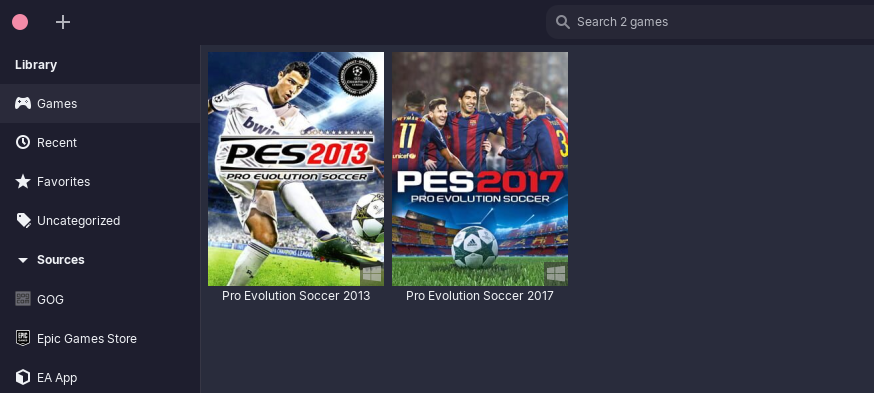
That’s a screenshot of me successfully running PES 2013 and PES 2017 without a single hitch.
Unfortunately, the winning streak came to a grinding halt when I faced repacks from FitGirl or DODI.
During the installation process, I kept running into the dreaded IsDone.dll error.
Apparently, it’s caused by the installer limiting memory allocation or something along those lines. You can read the full details on this Reddit thread.
I tried troubleshooting it using Bottles and even Flatseal, but absolutely nothing worked.
In the end, I just ended up overcomplicating things and driving myself crazy.
Look, at the end of the day, Linux has become vastly more reliable for gaming now.
But I have to be objective and admit it: when it comes to out-of-the-box convenience for this kind of stuff, Windows still wears the crown.
So the solution is obvious: just buy the official games on Steam.
It’s way easier, you just click install, and you can enjoy happy gaming without losing your mind over error codes!